Capture
A dream is one press away
Dreams fade in the time it takes to find an app. So the app comes to you: a widget, a Lock Screen action, a capture field on the home screen that is already waiting.
Free, always
From the Lock Screen, past the lock
On iPhone the capture action can sit in Control Center or on the Lock Screen, and on both iOS and Android there is a home-screen widget. Night capture opens straight into recording and is write-only: it shows nothing already in the journal, so it can run before the app lock has been passed, and the lock arms itself again on the way out.
Three words is an entry
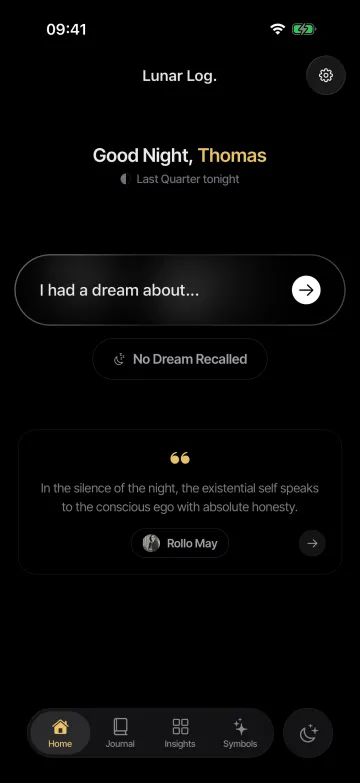
The home screen opens on a field that says "I had a dream about…". Type three words, save, and go back to sleep. The dream keeps its original time. Every keystroke is saved as you go, so drifting off mid-sentence loses nothing.
Finish it over coffee
A dream captured at 3 a.m. is a draft, not a chore. In the morning it is waiting at the top of the journal to be read through, filled in, and tagged, and if nothing came back at all, a blank night is one tap.
How to add the widgets
There are two: Log a Dream opens a new entry, Quick Capture opens straight into recording. Both go anywhere a widget can.
- iPhone Home Screen. Touch and hold an empty spot on the Home Screen, tap Edit, then Add Widget. Search for Lunar Log and choose Log a Dream or Quick Capture, in the small or medium size.
- iPhone Lock Screen. Touch and hold the Lock Screen, tap Customize, then Lock Screen. Tap the widget strip under the clock, search for Lunar Log, and add Log a Dream or Quick Capture. The same two are available for the two buttons at the bottom of the Lock Screen: tap one, remove its control, and pick Lunar Log from the list.
- Control Center. Open Control Center, touch and hold an empty spot, then tap Add a Control. Search for Lunar Log and add Log a Dream or Quick Capture. The Action button on recent iPhones can be set to either as well, under Settings, Action Button, Controls.
- Android. Touch and hold an empty spot on the home screen, tap Widgets, find Lunar Log, and drag Log a Dream or Quick Capture onto the screen.
Start your dream journal tonight.
Free to journal, forever. No account needed to start.